I Built an AI Ultrarunner to QA My App
I’ve been building a race tracking app for ultrarunners. It lets you manage your race calendar, track gear, write journey entries, and plan your season. The problem? I have no users yet. Just me.
That means nobody is poking around, trying weird things, or stumbling into edge cases. The app has unit tests, CI checks, type checking — all the usual stuff. But there’s a whole class of bugs that only surface when someone actually uses the thing. Opens the browser, clicks around, creates records, and goes “wait, that doesn’t look right.”
So I built an AI agent to be my first real user.
The idea
What if I could have an experienced ultrarunner — someone who actually thinks about race planning, gear lists, and training logs — explore my app once a week and file bug reports?
Not a traditional test suite that checks “does endpoint X return 200.” More like a QA tester who sits down, uses the app the way a real person would, and says “hey, this countdown shows 2,912,373 days — that can’t be right.”
The setup
The whole thing runs as a GitHub Actions workflow with three main pieces:
1. Claude Code as the brain. It reads the codebase to understand the app’s architecture, then acts as an ultrarunner persona exploring the live site.
2. Playwright as the hands. Claude writes and runs Python scripts using Playwright to control a headless browser — navigating pages, clicking buttons, filling forms, taking screenshots.
3. GitHub Issues as the output. When it finds something wrong or has a feature idea, it files an issue with the exploratory label plus bug or enhancement.
The workflow triggers every Monday at 9am UTC, or I can kick it off manually with an optional “focus area” — like “gear management” or “race creation” — to direct the agent’s attention.
What the agent actually does
The prompt tells Claude to think like an ultrarunner who relies on this app:
- Create races with realistic data (Western States 100, Hardrock, UTMB, local 50Ks)
- Move races through status transitions — dream, considering, registered, completed
- Build gear templates and pack lists
- Write journey entries
- Check the stats dashboards
- Try edge cases — empty fields, long names, special characters, past dates
- Test mobile responsiveness
It logs into a dedicated test account, explores for about 15-20 minutes, and files issues as it goes. There’s a deduplication step too — before exploring, the workflow dumps all existing open exploratory issues into a file so Claude knows what’s already been reported.
The first run
I won’t lie — the first attempt timed out. The agent spent 30 minutes deep in exploration and ran out of time before filing any issues. Classic “got too into it and forgot to write it up.” I bumped the timeout to 45 minutes and added explicit time management instructions to the prompt.
The second run? It worked. And it found real bugs.
Here’s what the agent reported after browsing the app for the first time:
- Sentinel date leak: Dream races use
9999-12-31internally as a placeholder date. The agent registered a dream race and saw “Dec 31, 9999” displayed in the UI with a countdown of 2,912,373 days. - Silent completion: Clicking “Mark Completed” on a race immediately changes its status without asking for results (finish time, placement, etc.) — a pretty important workflow gap for a race tracking app.
- Gear name bug: Gear template items were showing “200” as the item name instead of the actual name — a rendering bug in the frontend.
- Waitlisted races mixed in: Waitlisted races showed up in the Registered tab with no visual distinction.
- Long name overflow: Race cards broke their boundaries with long race names in the Someday tab.
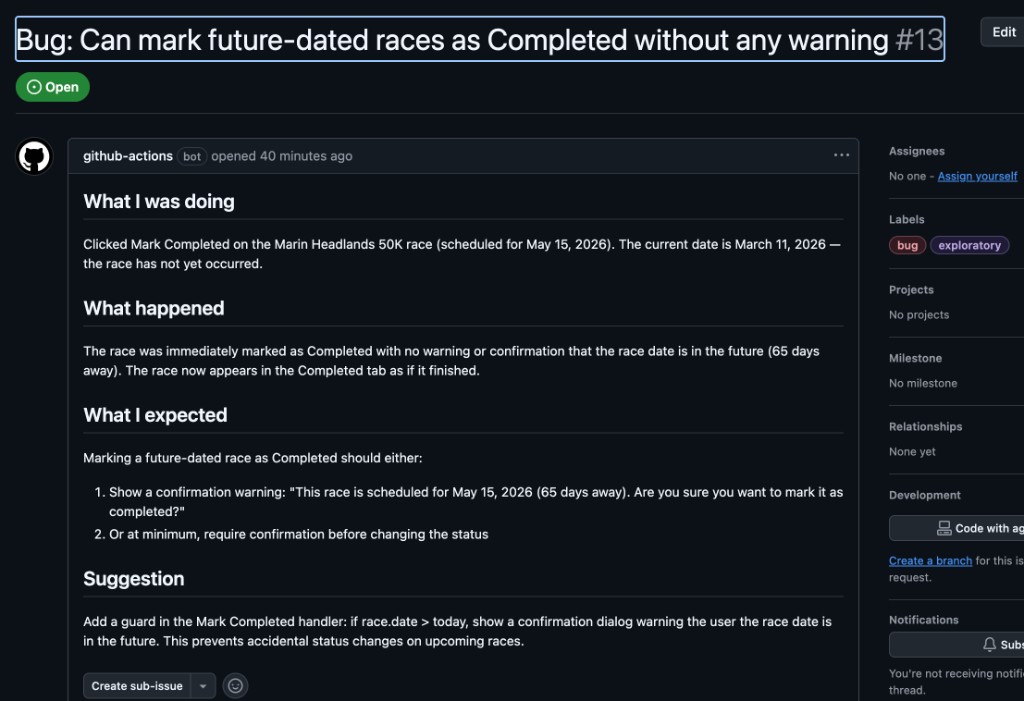
- Future completion: You could mark a race as “Completed” even if it’s scheduled for next year, with no warning.
Seven bugs and two feature suggestions. On the first real run. These are exactly the kind of issues that unit tests don’t catch — they’re UI rendering problems, missing validation, and workflow gaps that only surface when you actually use the app end-to-end.
The full loop
Here’s what makes this really fun: I already had a Claude Bug Fixer workflow that automatically attempts to fix any issue labeled bug. When you label an issue with bug, it triggers Claude Code to read the issue, fix the code, run the test suite, and open a PR.
But — and this is important — the exploratory agent’s issues don’t automatically trigger the bug fixer. GitHub Actions has a built-in safety mechanism: workflows using the default GITHUB_TOKEN don’t trigger other workflows. This prevents infinite loops.
So the flow is:
- Monday: The explorer agent browses the app and files issues
- Me: I review the issues, close any false positives or duplicates
- Me: For bugs I want auto-fixed, I remove the
buglabel and re-add it manually - Automatic: The bug fixer picks it up, writes a fix, runs tests, and opens a PR
- Me: I review the PR and merge
Here’s what it looks like in practice. The agent filed this bug about marking future-dated races as completed:
I reviewed it, agreed it was a real bug, and re-labeled it. The bug fixer immediately kicked in:

AI finds the bugs. AI fixes the bugs. I just review.
What I learned
Prompt engineering matters a lot. The first run timed out because the prompt didn’t mention time management. Adding “pick 2-3 areas, file issues as you go, don’t try everything” made the difference between a timeout and 9 actionable findings.
Browser testing catches what unit tests can’t. The sentinel date bug (9999-12-31 showing up) existed in the codebase for months. Unit tests check that the API returns the right data. But nobody tested what the UI does with that data — until the agent opened a browser.
The deduplication isn’t perfect. The agent filed the same feature suggestion twice in one run. Close enough for a first version — I can close duplicates faster than I can find bugs manually.
It’s genuinely useful even as the sole developer. I expected this to be a fun experiment. Instead, it immediately surfaced bugs I should have caught. Having a fresh pair of (AI) eyes on the app once a week is surprisingly valuable.
The cost
The whole thing runs on GitHub Actions free tier minutes (the ubuntu runner) plus Claude API costs for ~20 minutes of agentic exploration. It’s substantially cheaper than not finding these bugs.
Try it yourself
The workflow file is about 180 lines of YAML. The core ingredients:
- A GitHub Actions workflow with
scheduleandworkflow_dispatchtriggers - Playwright installed in CI (
pip install playwright && playwright install chromium) - Claude Code (
npm install -g @anthropic-ai/claude-code) - A detailed prompt with persona, credentials, exploration areas, and issue-filing instructions
- A test account on your live app
- An
ANTHROPIC_API_KEYsecret
The prompt is the most important part. Be specific about what persona to adopt, what to explore, how to manage time, and how to format the issues. And definitely tell it to file issues as it goes — otherwise it’ll spend all its time exploring and run out of time before reporting anything.
I never thought my app’s first power user would be an AI. But here we are — and honestly, it’s doing a better job at finding bugs than I expected.